
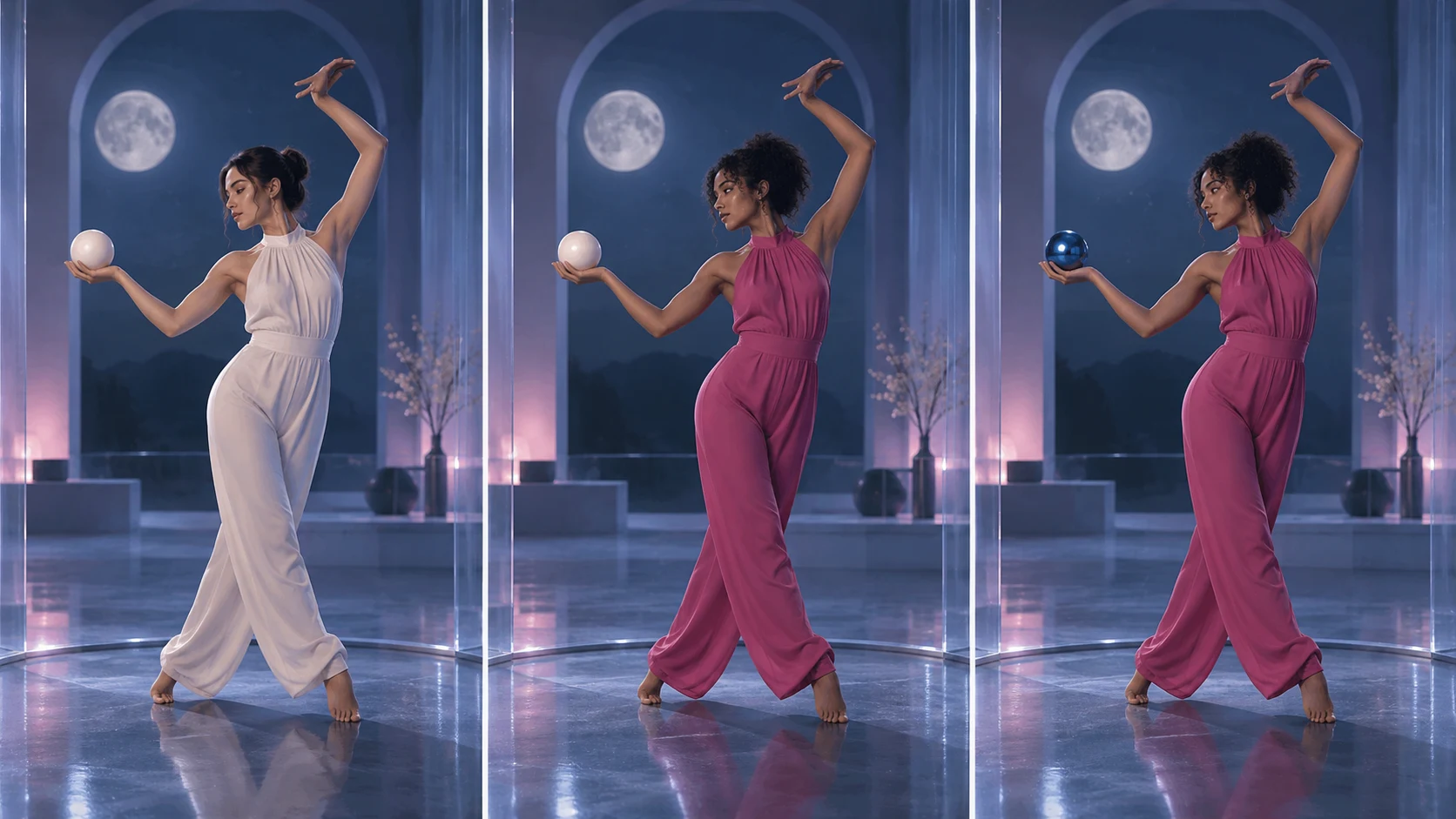
To edit footage with a Higgsfield Genjutsu workflow, start with a single-shot clip, choose the scope of the edit, add clean reference images, and describe both what changes and what stays locked. Choose Motion Transfer when a performance should drive a new character or scene. Choose Object Swap when one prop, garment, or person changes inside the existing shot. Review the full timeline before accepting the take.
The official product page documents these two Higgsfield Genjutsu modes. The preparation steps and prompt templates below are original editing checklists written for creators; this independent website (Genjutsu AI) operates separate models, accounts, and pay-as-you-go credits, and is not affiliated with Higgsfield.
Choose the Higgsfield Genjutsu mode from your brief
Ask whether you need the original scene or just its performance. In Higgsfield Genjutsu, Motion Transfer rebuilds the visual scene around reference movement; Object Swap targets a chosen element while aiming to retain the surrounding take. These are documented goals, not a guarantee of perfect preservation.
- New cast and setting: start with the Higgsfield Genjutsu Motion Transfer mode. Specify the movement you want to reuse and the appearance of the new scene.
- One replacement in a working shot: start with Higgsfield Genjutsu Object Swap. Identify the target by position, clothing, or its role in the action.
- Unsure about scope: write the desired edit in one sentence before choosing. If “keep this room” matters, Higgsfield Genjutsu Motion Transfer may conflict with the brief.
For Higgsfield Genjutsu experiments, make success observable. “The blue cup becomes a silver cup while the hand completes the same turn” is easier to assess than “make this cinematic.” If animating a still character with a reference video is your goal, try our AI motion transfer tool; if identity replacement in an existing scene is your main goal, our character replacement guide covers that preparation separately.
Prepare a small, useful reference set
1. Trim the source around the difficult action
For a first Higgsfield Genjutsu attempt, choose a continuous shot with a visible start and finish. Keep the moment that matters: a turn, a step, or a hand passing across the prop. Avoid making your first diagnostic clip a montage of unrelated angles.
Write three timestamps in your Higgsfield Genjutsu notes: the opening pose, the hardest contact or overlap, and the final pose. They become checkpoints when comparing results. A shorter test can make review easier, but use the current tool's accepted duration range.
2. Give every image a specific job
Prepare Higgsfield Genjutsu references that answer separate questions. A portrait shows the intended face; a wider image explains the silhouette or outfit; an object image shows the replacement's shape. Use assets you own or have permission to edit.
Before submitting to Higgsfield Genjutsu, remove pictures that disagree about essential details. Two different coat colors leave an unresolved choice. Several unrelated faces create a similar ambiguity. More uploads are useful only when they add a clear piece of information.
3. Check the interface you are actually using
Published pages can describe different upload limits. The Higgsfield Genjutsu product FAQ and its workflow article currently show differing reference limits. Confirm duration, image count, resolution, and the quoted cost directly in the live generator you are using.
Write a Higgsfield Genjutsu prompt as an editing instruction
A useful Higgsfield Genjutsu brief has four parts: identify the target, describe the replacement, list the protected features, and state how to judge the result. Mention any reference by the identifier the selected interface actually supports. The labels below describe roles; they are not universal upload syntax.
Keep a Higgsfield Genjutsu prompt focused enough to revise. If your Higgsfield Genjutsu request changes the face, wardrobe, room, lighting, and camera together, it becomes difficult to tell which instruction caused a failed take. Introduce extra changes only after the basic edit is acceptable.
Higgsfield Genjutsu prompt: move the performance to a new scene
Rebuild this continuous dance shot in a quiet rooftop setting at dusk. The character reference defines the new performer's face and dark tailored outfit. Follow the source's step sequence: step left, turn toward the camera, then finish with the right arm raised. Retain the same shot duration and camera distance. Do not add a cut or an extra performer.
Use this proposed Higgsfield Genjutsu prompt when the environment is allowed to change. Replace the action description with what your clip actually contains. A rooftop is a fictional example, not evidence of a generated result.
Higgsfield Genjutsu prompt: replace one handheld object
In the source shot, replace the round ivory sphere in the performer's left hand with the metallic blue sphere from the object reference. Keep the performer, outfit, room, and shot duration. The sphere should remain supported by the palm as the arm lifts. Preserve its round silhouette when the fingers pass in front of it. Keep the original camera framing.
For this Higgsfield Genjutsu brief, inspect the fingers and sphere together. A beautiful replacement that floats away from the hand fails the intended edit. If the prop starts off-screen, name where it first appears so the target remains unambiguous.
Review Higgsfield Genjutsu across time
Our suggested Higgsfield Genjutsu review uses two passes. First, play the entire clip at normal speed to assess whether the intended action reads correctly. Then inspect the marked difficult moments closely. Use the original clip beside the Higgsfield Genjutsu result when possible.
- Opening: check whether Higgsfield Genjutsu edited the intended person or object.
- Contact: inspect the Higgsfield Genjutsu result for a gap between the hand and prop, or a foot that slides during a planted step.
- Overlap: inspect how Higgsfield Genjutsu handles the moment when a limb, foreground object, or second person covers the replacement.
- Ending: verify that the final Higgsfield Genjutsu pose and visible identity still match the brief.
Record each Higgsfield Genjutsu defect as a timestamp and a concrete observation. “At the turn, the sleeve changes color” gives you an actionable revision. “Bad quality” does not tell you whether to change an image, narrow the target, or use a different mode.
For the next Higgsfield Genjutsu attempt, change one relevant instruction and keep the other inputs. Save both briefs. This makes the comparison meaningful and prevents an accidental second experiment from being mistaken for a repair.
Costs and questions before another attempt
Is Higgsfield Genjutsu free?
Do not assume so on the official product—check the current account offer and generation quote. On this independent studio (genjutsuai.dev), eligible accounts unlock 1 free 4-second Lite preview or claim 24 free credits across a 7-day check-in streak (plus a one-time $1.99 / 60-credit Trial Pack) to test a 4-second Lite run. Our Higgsfield Genjutsu alternative guide explains the service distinction.
Does Higgsfield Genjutsu guarantee a perfect face or exact timing?
Our sources do not establish that guarantee. Evaluate Higgsfield Genjutsu against your actual delivery requirements. Speech synchronization, fine typography, reflective props, and difficult overlaps may require a different workflow or additional finishing.
What should I save from a Higgsfield Genjutsu test?
Keep a Higgsfield Genjutsu record of the source, image order, chosen mode, prompt, quoted cost, output, and acceptance notes. Browse our 30 copy-paste Genjutsu AI prompts or Higgsfield Genjutsu Restyle guide for mode-specific templates, and read this studio's pricing and credit terms separately before purchasing packs.
Make the next edit measurable
Prepare one Higgsfield Genjutsu brief with a named target, a compatible reference, and three review checkpoints. Generate only after checking the current inputs and quote. Accept the result when the full take meets your brief, not when a single frame looks convincing.
You can stage your clip and reference image directly in our Genjutsu generator or /create studio. Preparing an edit here uses this independent studio's models and credit quotes rather than the official Higgsfield service.
Sources
Reviewed October 8, 2026. Public documentation and original preparation advice; no paid generation benchmark.