Skip to Main Content
Start creatingCreate
Back to blogReviewed

Best AI Tools to Change Video Clothes (2026)Workflows, Watermarks & Credit Pricing

Compare the best AI tools to change clothes in video, or test a garment photo swap right below.

Prompt

Default outfit edit · No extra text needed

Keep source audio
0 / 10000
Balance: — creditsCost: —
Usage notes
Quick prompts0 added

Click to add. Click again to remove. Your own text stays.

Be specific

Name the person and clothing, e.g. the gray T-shirt on the person in front.

This guides the edit; it does not lock the face or limit changes to clothing. Review the full video before use.

Files upload for checks after sign-in. Checking the cost uses no generation credits; clicking Generate reserves the displayed credits.

Generated videos are stored for 7 days after completion. Download yours before it expires.

WORKFLOW SNAPSHOT

Best AI tools to change clothes in video at a glance

Independent guide reviewed . Unaffiliated with Higgsfield, Runway, Pika, or Kling; accounts stay separate.

Pay-As-You-Go Pick

Video + Garment Photo

Genjutsu AI lets you change clothes in video from one garment photo with upfront quotes and watermark-free exports.

Keyframe NLE

Keyframe Propagation

Runway Edit Studio edits one keyframe outfit and propagates it across the shot inside a monthly plan.

Subscription Suites

Object Swap & Omni

Higgsfield, Pika, and Kling fit creators on active memberships or full-scene restyling workflows.

Comparison matrix of 2026 studios by outfit workflow, inputs, free credits, watermarks, and billing
StudioOutfit workflowInputs & clip windowFree creditsWatermarkBilling model
Genjutsu AIThis siteChange clothes in video via garment photoVideo + 1 photo · 4-30s24 check-in / $1.99 TrialNo watermarkOne-time packs ($7.90 / €6.99+); 10 currencies
Higgsfield GenjutsuObject Swap outfit replacementClip + outfit refs · 4-30sVaries by offerVerify in accountWeb subscription + separate API
Runway Edit StudioKeyframe wardrobe propagationClip + keyframe · plan limit125 one-time creditsStandard+ cleanMonthly subscription; no Free top-up
PikaSwap Anything / PikaffectsClip + image or promptLimited Free tierStarter+ cleanSubscription + add-on packs
KlingVIDEO 3.0 Omni outfit editClip + prompt & refsBasic free creditsStandard+ cleanMembership + credit top-ups

STUDIO BREAKDOWNS

5 best AI tools to change clothes in video compared

Compare how each studio handles uploaded clips, garment photos, watermarks, and credit pricing.

Object Swap Suite

Higgsfield Genjutsu

Object Swap workflow to change clothes in video

Object Swap4-30s ClipWeb + API Credits
Workflow
Pairs a source clip with outfit references under Object Swap. Official guides cite 3-30s or 4-30s limits; confirm in the uploader.
Pricing & exports
Uses Higgsfield web credits and subscription tiers; API billing is separate. Verify trial and watermark terms in your account.
Watch for
Object Swap may alter faces or backgrounds beside garments. Credits do not transfer here.
Keyframe Timeline

Runway Edit Studio

Keyframe workflow to change clothes in video

Keyframe Edit125 Free CreditsStandard+ Clean
Workflow
Edits one keyframe outfit from your uploaded clip, previews the still look, and propagates it across the shot.
Pricing & exports
Free tier grants 125 one-time credits with watermarked exports and no top-ups. Standard+ plans remove watermarks.
Watch for
Check Edit Studio availability and per-second burn before running multi-shot passes.
Social Effects

Pika

Fast element swaps and stylized social edits

Swap AnythingSocial ClipsStarter+ Clean
Workflow
Pairs uploaded clips with reference images or prompts inside Swap Anything and Pikaffects modes for quick variations.
Pricing & exports
Limited Free tier plus Starter, Standard, and Pro plans. Paid tiers document clean exports.
Watch for
Motion modes can reshape body silhouette when you only want a garment swap.
Omni Video Suite

Kling (VIDEO 3.0 Omni)

Omni subject and scene restyling on uploaded footage

VIDEO 3.0 OmniSubject + SceneStandard+ Clean
Workflow
Combines uploaded footage with prompts and visual references to restyle outfits and subjects in one pass.
Pricing & exports
Basic free tier adds watermarks. Standard+ memberships unlock clean downloads; standalone packs may keep watermarks.
Watch for
Keep prompts focused strictly on clothing so Omni preserves scene lighting.

How to choose the best AI tools to change clothes in video

We compared public docs for AI tools to change clothes in video on uploaded footage rather than text-only clips.

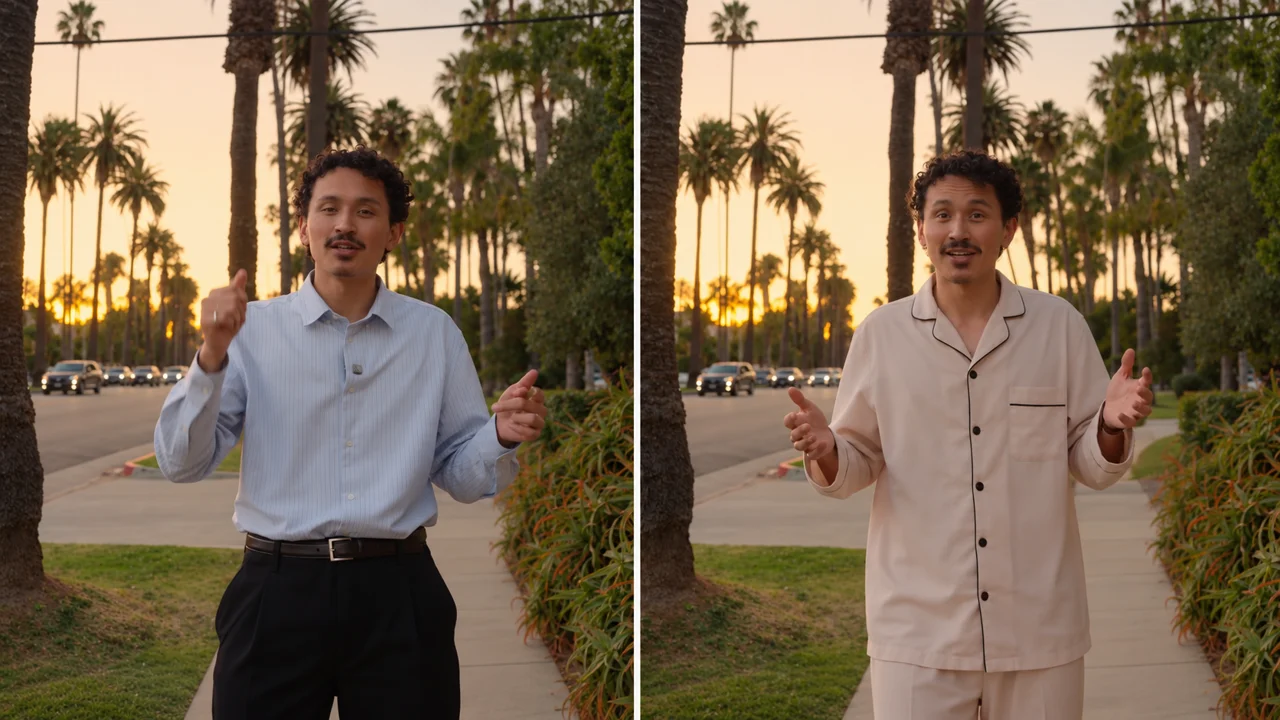
A blue shirt and pale pajamas compared in the same street scene
Scope disclosure: Illustrative wardrobe comparison on one outdoor take, not a cross-vendor benchmark.
  • Garment photo vs keyframe input

    Use Genjutsu AI or Higgsfield when starting from a product photo, or Runway to repaint one keyframe.

  • Clip window & upfront quote

    Check the 4-30s segment limit and confirm you see a live credit quote before charging.

  • Watermarks & billing model

    Confirm whether clean exports work on one-time packs (Genjutsu AI) or require monthly subscriptions.

  • Motion & audio checks

    Inspect collar edges, arm crossings, face identity, and source audio across the clip.

Prompts and checks to change clothes in video

Even the best AI tools to change clothes in video perform cleaner when you name the wearer and lock non-garment details. Click Use in editor to prefill above.

Full outfit swap

Replace only the main person’s outfit in @video1 with the garment in @image1. Preserve face, hair, hands, motion, framing, and background.

Outer jacket swap

Swap only the main person’s outer jacket in @video1 for the jacket in @image1. Keep inner shirt, trousers, face, and lighting unchanged.

Shirt color match

Match only the main person’s shirt color in @video1 to @image1 while keeping original shirt cut, fabric folds, face, and background.

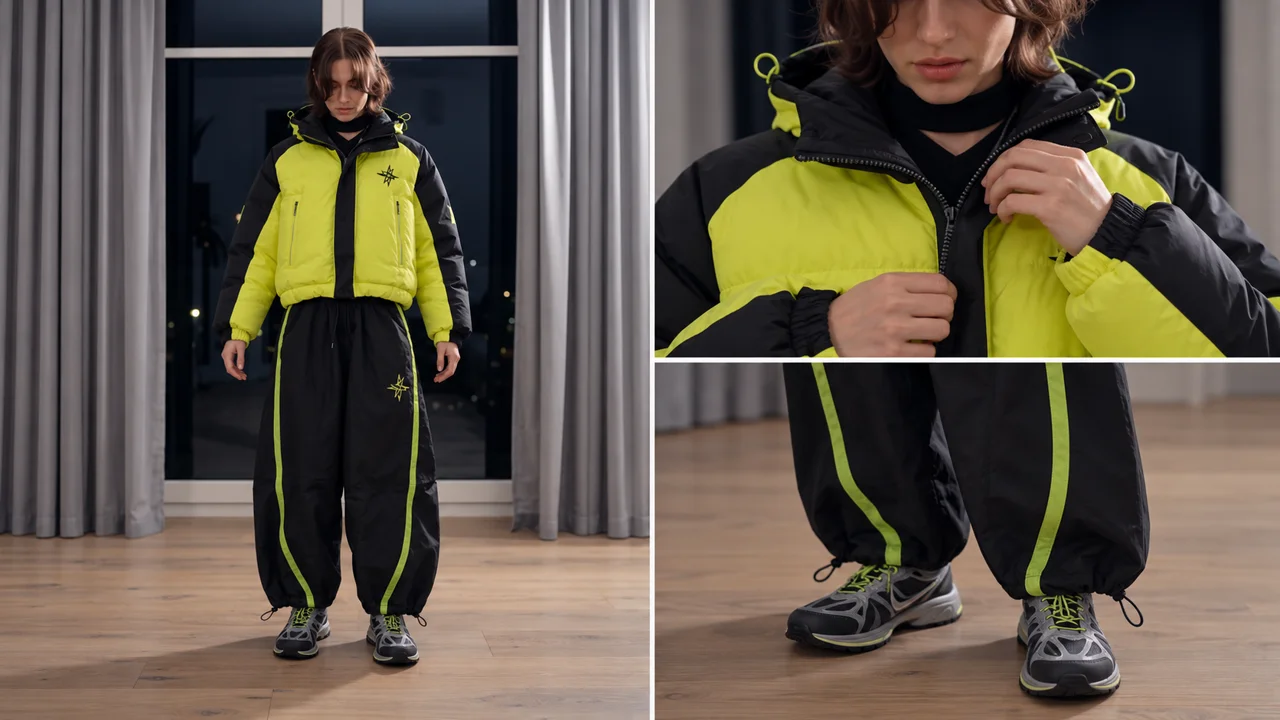
A yellow jacket with close views of zipper, cuffs and trouser hems
AI-generated illustration.

Pre-publish frame inspection

  • Test 4-8s first: validate garment drape on a short cut before a 30s render.
  • Use one garment photo: skip collages so sleeves and fabric texture transfer cleanly.
  • Scrub arm crossings: check start, middle, and end frames for collar or hand flicker.
  • Save within 7 days: download exports promptly and verify source audio.

FAQ: Best AI tools to change clothes in video

Answers on clip limits, watermarks, and pay-as-you-go credit packs.

What are the best AI tools to change clothes in video in 2026?

Genjutsu AI, Higgsfield Genjutsu, Runway Edit Studio, Pika, and Kling are the five documented options. Genjutsu AI focuses on pay-as-you-go garment photo swaps, Runway propagates edited keyframes, and Higgsfield, Pika, and Kling serve subscription suites.

How do AI tools to change clothes in video keep motion consistent?

They anchor timing, pose, and camera framing to your uploaded clip. No studio guarantees a strict garment-only mask on every frame. Faces, hands, and backgrounds can drift on fast turns, so review the full clip.

Can I export outfit swaps for free without a watermark?

Genjutsu AI exports without watermarks on both check-in reward credits and paid packs. Eligible accounts can claim up to 24 seven-day check-in credits or start with a $1.99 (60-credit) Trial Pack. Runway Free and Kling Basic add watermarks.

Which studio works without a monthly subscription?

Genjutsu AI offers one-time credit packs across 10 currencies with no recurring billing. Standard packs start at $7.90 (€6.99) for 220 non-expiring credits, with regional pricing in eligible markets. Independent studio, unaffiliated with Higgsfield or Runway.
What source files work best for wardrobe edits?

Use a steady 4 to 30 second video segment (up to 200 MiB) and one clear garment photo. MP4, MOV, WebM, and OGG clips pair with JPG, PNG, WebP, or HEIC photos at 300 px+ (up to 20 MiB).

Find a related tool, a practical guide, or the credit plan for your next edit.